
There’s been some debate about the “open to work” flag on LinkedIn profile photos, with some arguing that it makes a person look “desperate.” But according to JobScan, job seekers who turned on the function doubled their chances of getting a message from a recruiter.
That said, there are times you don’t want your search to be public knowledge. But don’t worry, you can customize who can see that you’re looking! Click the “open to” button on your profile, and then select the “finding a new job” option. Toward the bottom of the screen, you’ll see this set of choices:
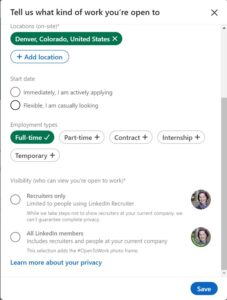
So you can still let recruiters know you’re looking while not alerting your current workplace.
And, of course, your own preferences matter, as well! If you want people to know you’re looking, add that little icon! If that feels super weird and uncomfortable, keep it off your profile.